AI Thumbnails Explained
How AI models generate high-converting thumbnails
January 18, 2024
AI Thumbnails Explained
How AI Generates Thumbnails (Without the Marketing Lies)
Thumbnails decide clicks. Not content quality, not production value — thumbnails.
AI didn’t magically “become creative”. It just learned what humans click and reproduces it at scale.
This blog breaks down how AI thumbnails are actually generated, step by step, without hype, fluff, or tool promotions.
What an AI Thumbnail Really Is
An AI thumbnail is not creativity.
It’s pattern replication trained on engagement data.
AI systems analyze millions of thumbnails that performed well (high CTR) and learn:
- Color contrast patterns
- Face positioning
- Emotion exaggeration
- Text placement
- Visual tension
Then they remix those patterns for new content.
That’s optimization, not imagination.
The Real Pipeline Behind AI Thumbnails
Every AI thumbnail tool — regardless of branding — follows the same pipeline.
1. Prompt & Input Understanding
AI starts by understanding:
- Text prompt (e.g. “AI shocked face tech thumbnail”)
- Optional image (face, product, logo)
- Platform context (YouTube, blog, social)
This is handled using text–image encoders (CLIP-like models).
Bad prompt = bad output.
AI does not “guess intent”. It matches probability.
2. Image Generation (Diffusion Models)
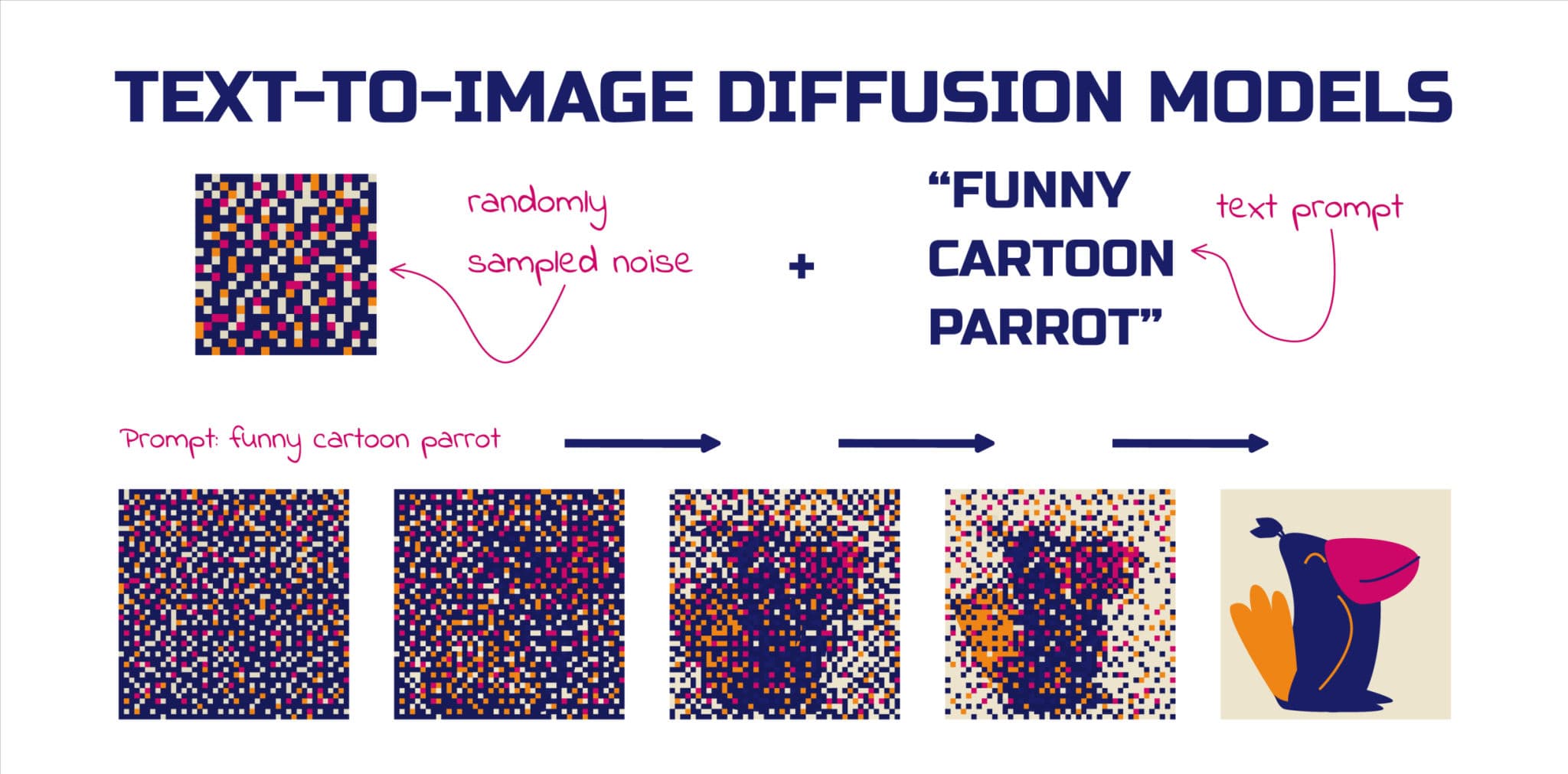
Most AI thumbnails are generated using diffusion models.
How diffusion works (simplified):
- Start with random noise
- Remove noise step-by-step
- At each step, align pixels closer to the text meaning
The result looks intentional, but it’s statistically guided randomness.
Important truth:
AI doesn’t know what a “good thumbnail” is — only what similar thumbnails looked like.
3. Composition Rules (Learned, Not Designed)
AI enforces composition patterns it learned from high-performing thumbnails:
- Face on one side
- Subject centered
- Empty space for text
- Strong foreground–background separation
This is why AI thumbnails feel repetitive.
They’re not wrong — they’re over-optimized.
4. Style Injection
Styles are applied using:
- Fine-tuned models
- LoRA adapters
- Style embeddings
Examples:
- High saturation “YouTube” look
- Cinematic lighting
- Tech-minimal gradients
- Cartoon exaggeration
AI never invents styles.
It recombines existing ones.
5. Text Placement & Emphasis
Text in AI thumbnails is optimized for:
- Eye-tracking data
- Readability at small sizes
- Contrast ratios
That’s why AI prefers:
- 1–4 words
- Bold fonts
- Emotion-driven phrases
Examples:
- “THIS FAILED”
- “YOU’RE WRONG”
- “AI CHANGED EVERYTHING”
This isn’t manipulation. It’s pattern learning.
Why AI Thumbnails Get Clicks
AI optimizes for CTR, not taste.
It prioritizes:
- Emotional faces (shock, anger, curiosity)
- Bright color contrast
- Simple visual message
- Clear focal point
Humans click patterns, not originality.
That’s uncomfortable — but true.
Where AI Thumbnails Fail
AI is powerful, but limited.
Lack of Originality
Most AI thumbnails look the same because:
- Training data is the same
- Engagement patterns are the same
AI amplifies sameness.
Zero Brand Awareness
AI doesn’t understand:
- Your audience history
- Brand trust
- Long-term perception
It will happily destroy credibility for short-term clicks.
Over-Optimization
High CTR ≠ high retention.
Clickbait thumbnails may get views, but they train your audience to distrust you.
AI does not care about that.
The Only Workflow That Actually Works
AI should assist, not decide.
Best workflow:
- Generate multiple thumbnail options using AI
- Manually select one
- Adjust:
- Crop
- Text
- Emotion
- A/B test
Pure AI thumbnails lead to generic growth. Human judgment creates brand value.
Common AI Thumbnail Patterns (Used Everywhere)
You’ve seen these — now you know why they exist:
- Face zoom (emotion trigger)
- Blurred background (attention control)
- Arrows and circles (visual hijack)
- Before/After splits (curiosity gap)
They’re not tricks. They’re learned signals.
The Future of AI Thumbnails
What’s coming next:
- Automatic A/B testing
- Audience-specific thumbnails
- CTR prediction before publishing
- Emotion-adaptive visuals
One video → multiple audiences → multiple thumbnails.
This is inevitable.
Final Reality Check
AI thumbnails are:
- ❌ Not creative
- ✅ Extremely efficient
- ❌ Not brand-aware
- ✅ Data-driven machines
If you want speed → use AI
If you want uniqueness → guide AI
If you want trust → override AI
AI doesn’t replace taste.
It exposes the lack of it.
Written with logic, not hype.